
Russia



Back
How to Fix the “Redirected You Too Many Times” Error
Browser & Website Error Guide · 2026 Edition
How to Fix
“Redirected You Too Many Times”
Learn the quickest and most reliable ways to fix the “ERR_TOO_MANY_REDIRECTS” error on websites, WordPress installations, VPS-hosted applications, and dedicated server environments.
Introduction
The “Redirected You Too Many Times” error is one of the most common website issues encountered by administrators, developers, and website owners. It typically appears in browsers such as Chrome, Firefox, Edge, and Safari when a website enters an endless redirect loop.
Instead of loading the requested page, the browser continuously redirects between URLs until it eventually stops and displays an error message such as ERR_TOO_MANY_REDIRECTS.
This issue can affect WordPress websites, eCommerce stores, SaaS platforms, custom web applications, and even enterprise environments. In many cases, the problem originates from incorrect URL settings, SSL configuration mistakes, caching conflicts, or server-level redirect rules.
The good news is that redirect loop errors are usually straightforward to diagnose and fix once the root cause is identified. This guide explains why the error occurs, how to troubleshoot it effectively, and the fastest solutions for restoring normal website functionality.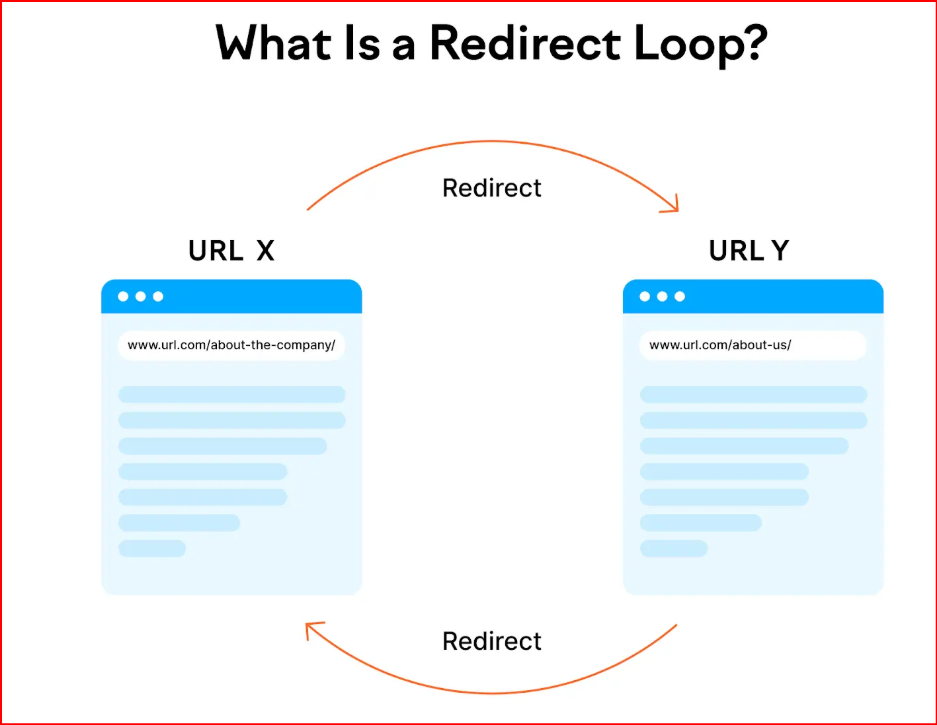
What Does “Redirected You Too Many Times” Mean?
This error occurs when a website repeatedly redirects visitors between two or more URLs without reaching the final destination page.
For example:
- HTTP redirects to HTTPS
- HTTPS redirects back to HTTP
- www redirects to non-www
- non-www redirects back to www
- Application redirects conflict with server redirects
Because the browser detects an endless loop, it stops loading the page and displays the error message.
In most situations, the issue is caused by configuration conflicts rather than hardware or network failures.
Common Causes of Redirect Loop Errors
Cause #1: Incorrect Website URL Settings
One of the most common causes is a mismatch between the configured website URL and the actual domain being used.
For WordPress websites, incorrect Site URL or Home URL settings frequently create redirect loops.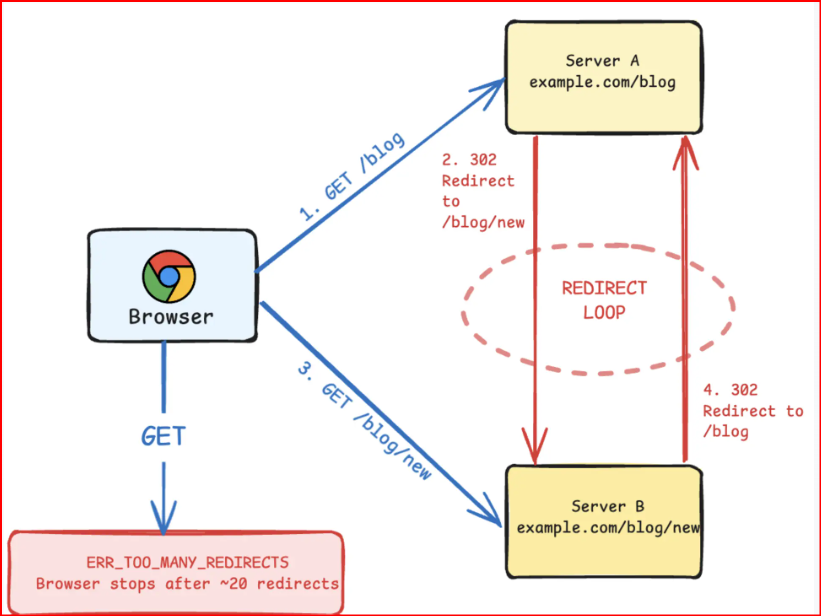
How to Check:
wp option get home

wp option get siteurl
Ensure both URLs match your preferred domain format.
Cause #2: SSL Configuration Problems
Improper SSL settings often trigger endless redirects.
This commonly happens when HTTPS is enforced at multiple levels simultaneously.
Check:
- SSL certificates are valid
- HTTPS redirects are configured correctly
- Cloudflare SSL mode matches server settings
- No conflicting redirect rules exist
Cause #3: Browser Cookies and Cache
Corrupted cookies can sometimes cause browsers to repeatedly request outdated redirects.
Quick Fix:
- Clear browser cache
- Delete cookies for the affected website
- Open the site in Incognito Mode
- Test using another browser
This simple step resolves many redirect-related issues immediately.
Cause #4: Faulty Redirect Rules
Incorrect .htaccess or Nginx redirect rules frequently create loops.
Apache Example:
RewriteEngine On
RewriteCond %{HTTPS} off
RewriteRule ^(.*)$ https://%{HTTP_HOST}%{REQUEST_URI} [L,R=301]
Review all redirect rules carefully and remove duplicates.
Cause #5: WordPress Plugin Conflicts
Security, caching, SEO, and redirection plugins can sometimes generate conflicting redirect instructions.
How to Check:
wp plugin deactivate --all
Reactivate plugins one by one to identify the problematic extension.
Cause #6: Cloudflare Redirect Settings
Cloudflare can create redirect loops when SSL modes and redirect rules conflict with origin server settings.
Verify:
- Flexible SSL is not conflicting with HTTPS redirects
- Page Rules are configured correctly
- Redirect Rules do not duplicate server redirects
Cause #7: Reverse Proxy Misconfiguration
Load balancers, reverse proxies, and containerized environments may incorrectly forward protocol headers.
Review:
- X-Forwarded-Proto headers
- Proxy redirect settings
- Backend application URLs
- Load balancer SSL termination
Quick Troubleshooting Checklist
Follow these steps in order to identify the source of the redirect loop:
- Clear browser cache and cookies.
- Test the website in Incognito Mode.
- Verify website URL settings.
- Review SSL certificate configuration.
- Inspect .htaccess or Nginx redirect rules.
- Disable caching and redirect plugins.
- Check Cloudflare SSL settings.
- Review reverse proxy configurations.
- Monitor server logs for redirect activity.
- Retest after each change.
This structured approach helps isolate the issue quickly and minimizes unnecessary downtime.
Preventing Future Redirect Errors
Preventing redirect loops is easier than troubleshooting them repeatedly.
- Use consistent URL structures.
- Avoid duplicate redirect rules.
- Monitor SSL certificate renewals.
- Test configuration changes in staging environments.
- Keep plugins and applications updated.
- Review Cloudflare settings regularly.
- Document redirect policies.
- Monitor website logs continuously.
These best practices significantly reduce the risk of future redirect-related outages.
Why Hosting Infrastructure Matters
Although redirect loops are usually configuration-related, reliable hosting infrastructure makes troubleshooting much easier.
Modern VPS and dedicated server environments provide better visibility into logs, server settings, SSL management, and application behavior.
For production websites, consider infrastructure that includes:
- NVMe SSD storage
- KVM virtualization
- Dedicated CPU resources
- Reliable networking
- Automated backups
- Advanced monitoring tools
- DDoS protection
A stable hosting environment helps administrators identify and resolve redirect issues faster while maintaining website performance.
Final Thoughts
The “Redirected You Too Many Times” error may seem frustrating, but it is usually caused by a configuration conflict that can be resolved quickly.
By checking URL settings, SSL configurations, redirect rules, browser cache, plugins, and Cloudflare settings, administrators can identify the root cause and restore normal website functionality.
Whether you manage a WordPress blog, online store, SaaS platform, or enterprise application, understanding redirect loops is essential for maintaining uptime and delivering a smooth user experience.
With proper monitoring, careful configuration management, and reliable infrastructure, most redirect loop errors can be fixed within minutes and prevented from returning.
“`