
Russia




How to Create a Website and Set Up Basic SEO
A complete beginner-friendly 2026 guide to building a website, choosing hosting, creating content, and optimizing your site for Google rankings.
by hamza
Why Creating a Website Still Matters in 2026
Creating a website in 2026 is easier than ever, but building one that actually attracts visitors requires more than just design. A successful website needs strong structure, useful content, fast performance, and basic SEO.
Whether you are starting a blog, business website, portfolio, or online store, your website gives you a professional online home that you fully control.
With the right SEO setup, your website can appear on Google, attract organic traffic, and grow over time without relying only on paid ads.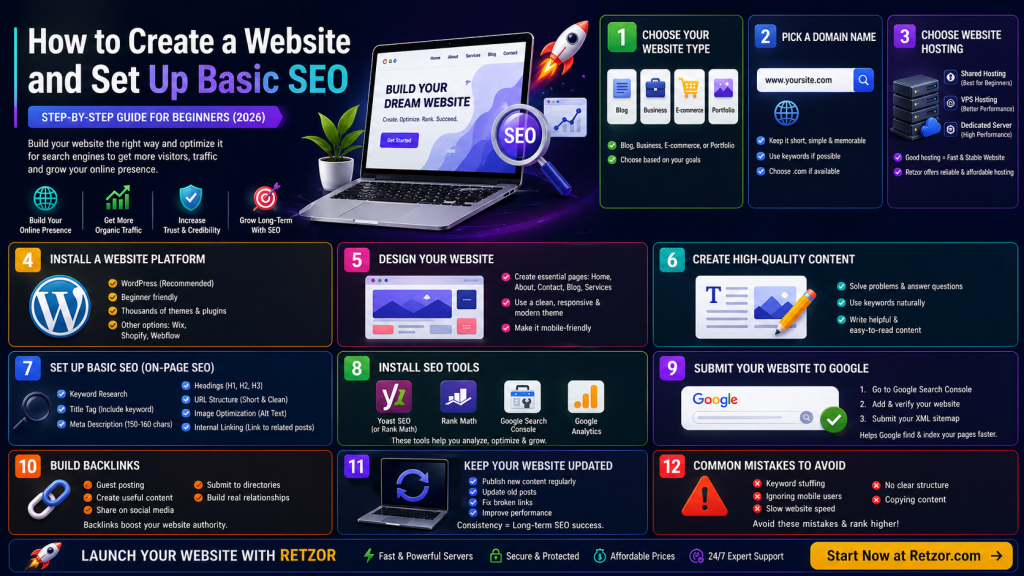
Quick Summary
- Choose the type of website you want to build.
- Pick a domain name and reliable hosting.
- Install a platform such as WordPress.
- Create important pages and useful content.
- Set up basic SEO, submit your sitemap, and track performance.
1) Choose Your Website Type
Before building your website with our vps hosting , decide what kind of site you need. This helps you choose the right platform, design, pages, and SEO strategy.
- Blog: Best for articles, tutorials, and guides.
- Business website: Best for services, contact information, and brand trust.
- E-commerce store: Best for selling products online.
- Portfolio: Best for showing your work, projects, or creative skills.
2) Pick a Domain Name
Your domain name is your website address, such as yoursite.com. A good domain should be short, memorable, and easy to type.
Example: yoursite.com
Avoid numbers, hyphens, and confusing spelling. If possible, choose a .com domain and include a keyword naturally.
3) Choose Website Hosting
Hosting is where your website files are stored. The right hosting improves speed, reliability, and user experience.
- Shared hosting: Affordable and beginner-friendly.
- VPS hosting: More control, better speed, and good scalability.
- Dedicated server: Best for high-traffic or performance-focused websites.
4) Install a Website Platform
WordPress is still one of the best choices for beginners because it is flexible, easy to manage, and works well for SEO.
Recommended platform: WordPress
Other options include Wix for simple drag-and-drop websites, Shopify for e-commerce, and Webflow for design-focused websites.
5) Design Your Website
A good website design should be clean, fast, mobile-friendly, and easy to navigate. Do not overload your site with too many colors, popups, or heavy images.
- Home page
- About page
- Contact page
- Blog page
- Services or products page
6) Create High-Quality Content
Content is the foundation of SEO. Your content should answer real questions, solve problems, and provide useful information to your audience.
Good content = useful + clear + searchable + easy to read
7) Set Up Basic SEO
| SEO Element | What to Do |
|---|---|
| Keyword Research | Find search terms your audience uses. |
| Title Tag | Include your main keyword and keep it under 60 characters. |
| Meta Description | Write a clear 150–160 character summary that encourages clicks. |
| Headings | Use H1, H2, and H3 tags to structure your content. |
| URL Structure | Use short, clean URLs with keywords. |
8) Use SEO-Friendly URLs
Your URLs should be short, readable, and focused on the topic of the page.
yoursite.com/create-website-seo
9) Optimize Images
Images improve the look of your website, but large files can slow it down. Compress images before uploading and use descriptive alt text.
- Use compressed images
- Add alt text
- Use WebP format when possible
- Use relevant file names
10) Install SEO Tools
SEO tools help you optimize pages, track search performance, and fix technical issues.
- Yoast SEO
- Rank Math
- Google Search Console
- Google Analytics
11) Submit Your Website to Google
After creating your website, submit it to Google Search Console so Google can find and index your pages faster.
- Go to Google Search Console.
- Add and verify your website.
- Submit your XML sitemap.
12) Build Backlinks
Backlinks are links from other websites to your site. They help search engines understand that your website is trustworthy and valuable.
- Write guest posts
- Create useful guides
- Share content on social media
- Submit your business to trusted directories
Common Beginner SEO Mistakes
| Mistake | Better Approach |
|---|---|
| Keyword stuffing | Use keywords naturally. |
| Ignoring mobile users | Use responsive design. |
| Slow website speed | Compress images, use caching, and choose better hosting. |
| No clear structure | Use headings, menus, and internal links. |
| Copying content | Create original, helpful content. |
How Long Does SEO Take?
SEO is a long-term strategy. It usually takes time before results appear, especially for new websites.
- First results: 1–3 months
- Good traffic: 3–6 months
- Strong rankings: 6–12 months
Final Thoughts
Creating a website in 2026 is simple, but making it successful requires planning, useful content, and basic SEO. Start with a clear website goal, choose reliable hosting, create essential pages, and optimize every page for users and search engines.
Focus on quality content, fast performance, mobile-friendly design, internal links, and consistent updates. With time and consistency, your website can grow into a strong online presence that attracts visitors and builds trust.